 AZ TOOLS

AZ Space Switcher
Enum-driven space switching for a control and up to five drivers. One node in the rig hierarchy, everything else hidden.
- Rigging
- Version 2.0.4
- Maya 2023 – 2027
- Windows
- Licensed
What it does
Pick a control, add the objects it should be able to follow, press one button. The control gets a Space enum in the Channel Box: World, then every driver in the order you chose. Keying the enum switches which object the control follows.
The tool is built for animation rigs: the control keeps its channel values and its locked channels, the rig hierarchy receives exactly one extra node, and an existing switch can be updated or removed without leaving anything behind.
Workflow
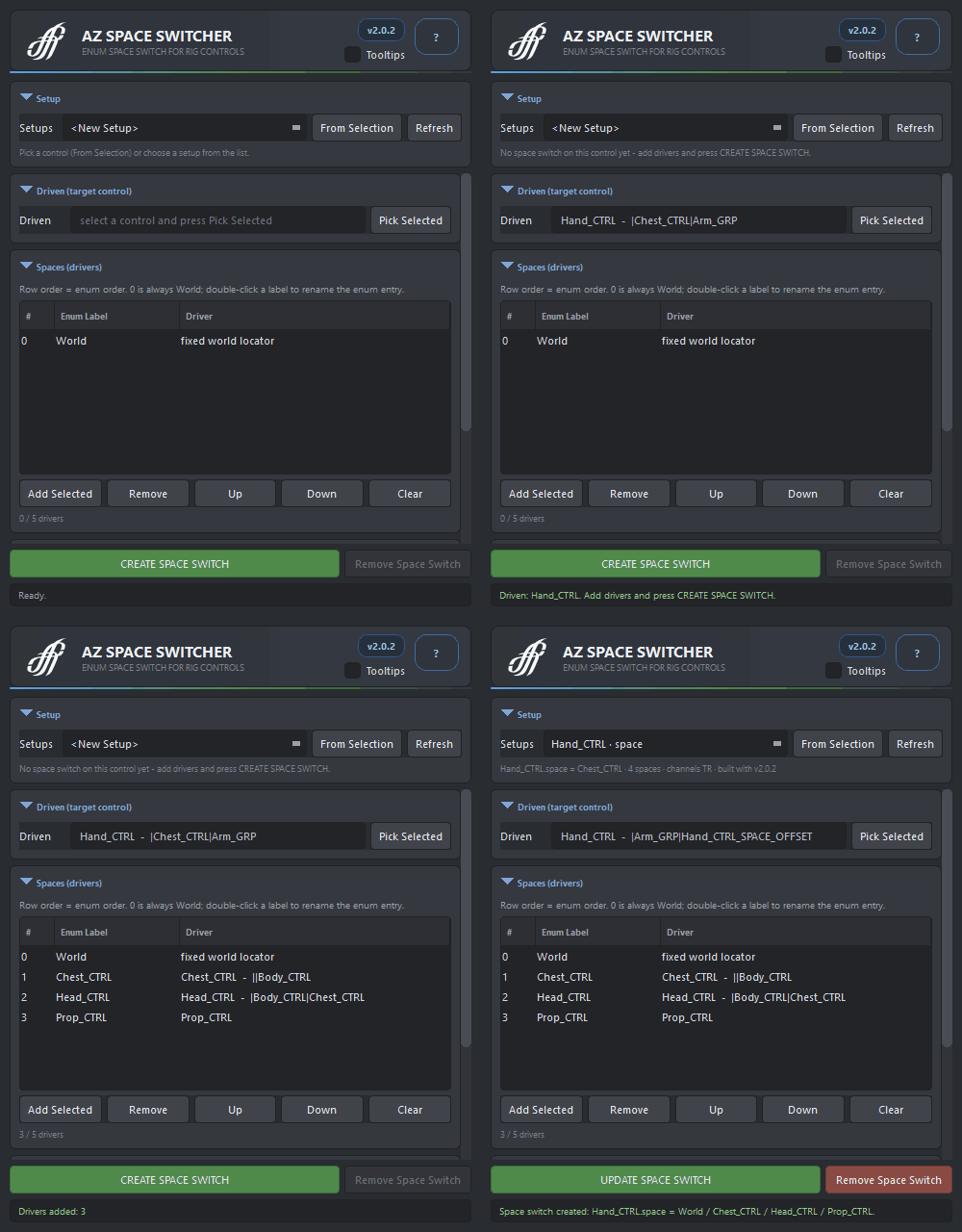
- Select the control and press Pick Selected, or From Selection at the top. If the control already has a space switch, the whole form is loaded from it and the build button turns into UPDATE.
- Select the driver objects and press Add Selected. The row order is the enum order: 0 = World, then the drivers. Reorder with Up / Down, double-click a label to rename the enum entry.
- Choose the channels (Translate, Rotate, Scale) and the attribute name, then press CREATE SPACE SWITCH. The whole build is one undo step.
- Switch spaces with the new enum attribute in the Channel Box, keyed like any other attribute.
Build in the default pose. Every space is created on the control's current world position, so the pose at build time is the pose all spaces agree on. Build and update with the rig at rest.
The window
- Setups
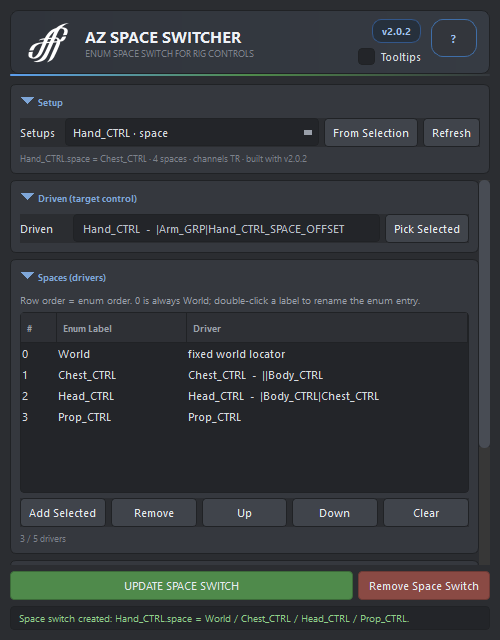
- Every space switch in the scene. Picking one loads it into the form; <New Setup> clears the form. Refresh rescans the scene.
- Driven control
- The control that switches spaces. Pick Selected takes the current selection. Picking the OFFSET node of an existing setup selects its control.
- Drivers
- Up to five objects the control can follow. Add Selected, Remove, Up, Down, Clear; double-click a row to rename its enum label.
- Channels
- Translate and Rotate are on by default; Scale adds scale following for rigs that scale their drivers.
- Enum name
- Long name of the enum attribute added to the control (
spaceby default). - Nice label
- What the Channel Box shows (
Spaceby default, may contain spaces). - CREATE / UPDATE SPACE SWITCH
- Builds the setup from the form, or rebuilds the existing one from scratch.
- Remove Space Switch
- Deletes the constraints, condition nodes, proxies, the enum attribute with its keys and the OFFSET node. The control returns under its original parent. Undoable.
How it is built
- The OFFSET node is inserted between the control and its parent with an identity local matrix. The control keeps its channel values, and locked channels never get in the way.
- Every space is a hidden proxy locator in one group at the scene root. World is an unconstrained proxy; every other proxy follows its driver through a parentConstraint, plus a scaleConstraint when Scale is on.
- point, orient and scale constraints run from the proxies to the OFFSET. Their weights are one-hot: one shared set of condition nodes compares the enum with 0, 1, 2 … so exactly one space is active.
- An existing setup is recognised through its connections, never through node names. Update tears the old network down and rebuilds it, so no stale targets, weights or condition nodes are left behind, while the OFFSET, the enum attribute, its value and its animation are kept.
Good to know
- Changing the driver order on update changes what the existing enum keys mean.
- A driver cannot be the control itself or one of its children: that is a dependency cycle. A driver that is constrained to the control cycles too.
- Enum labels never contain
:or=(Maya enum syntax), so namespaces are dropped from the default labels. - The proxy group may be parented under a static rig group. Parent it under the rig's main control to make World mean rig root.
- Setups built by versions before 2.0 are recognised through their connections and upgraded by UPDATE.
- Switching takes effect immediately on the keyed frame; the tool does not re-pose the control when the space changes.
Availability
AZ Space Switcher is a licensed product of AZ Tools, in the Rigging category. It is listed in the AZ Tools Manager for every account and installs once a license key is activated. Rigs built with it need nothing extra: the setup uses standard Maya nodes only, so a scene opens anywhere.
Get AZ Tools Manager