 AZ TOOLS

AZ Auto Playblast
A clean playblast in one press: the viewport is dressed for the shot, captured to MP4, AVI or PNG, and put back exactly as it was. Nothing in the scene is edited.
- Animation
- Version 0.2.0
- Maya 2023 – 2027
- Windows
- Free

What it does
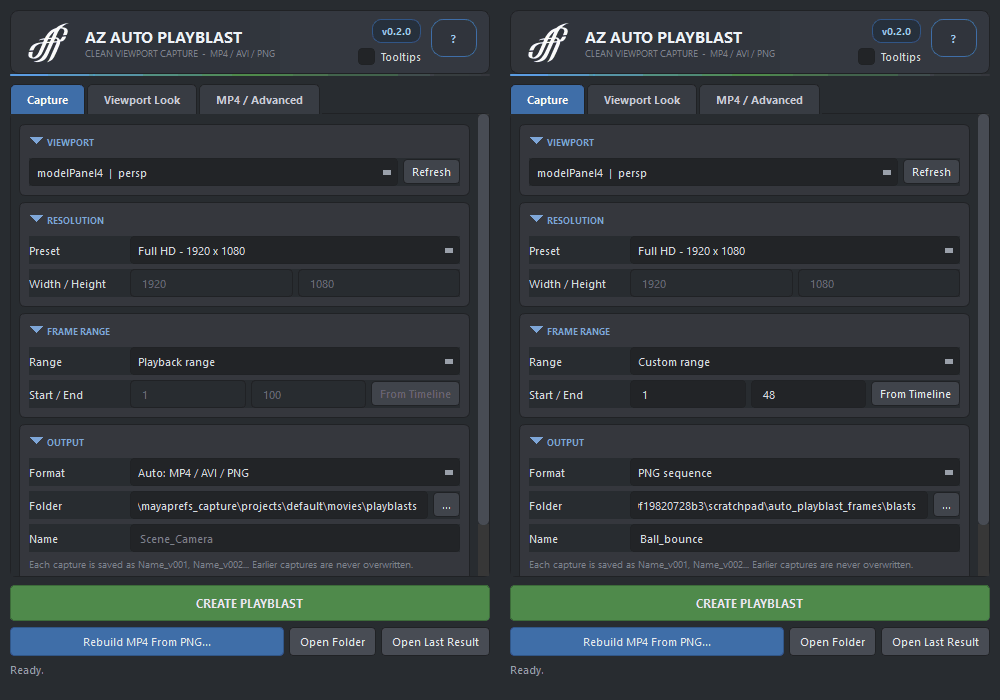
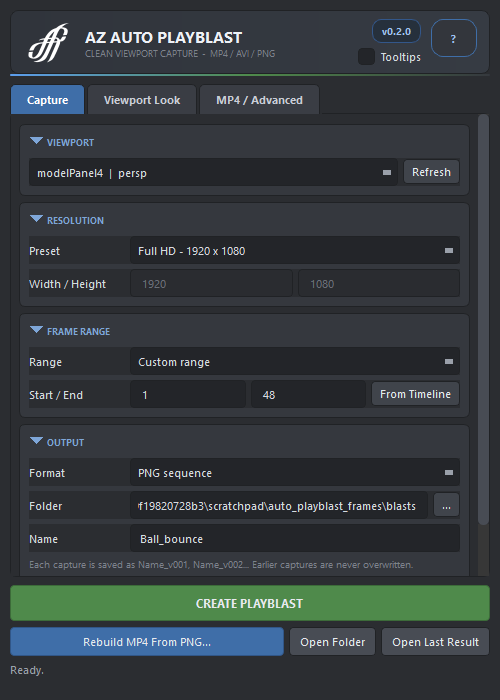
Pick the viewport, the resolution, the frame range and the format, press CREATE PLAYBLAST. The tool switches the viewport to Viewport 2.0 with textures, smooth shading and anti-aliasing, hides control curves, joints, locators and the grid, records, and then restores every setting it touched.
It never edits the scene: no transforms, no camera parameters, no visibility attributes, no selection change. Every capture lands in its own folder, Name_v001, Name_v002, with a capture.json that records what was captured. Earlier captures are never overwritten.
Workflow
- Pick the Viewport: the active one is selected; press Refresh after changing panels or cameras.
- Choose the Resolution preset (or Custom), the Frame Range (playback, highlighted on the Time Slider, or custom) and the Format.
- Set the output Folder and a Name; an empty name becomes scene and camera.
- Press CREATE PLAYBLAST. Esc stops the frame capture; Cancel stops an MP4 encode.
- With Keep source PNG on, Rebuild MP4 From PNG re-encodes a saved folder with another quality setting, or with and without audio, without replaying the scene.
The window
- Viewport
- Model panel to record, with the camera it shows.
- Resolution
- Presets from HD to 4K; Custom unlocks Width and Height.
- Range
- Playback range, the range highlighted on the Time Slider, or a custom start and end.
- Format
- MP4 (H.264 through FFmpeg with libx264, BT.709), AVI (Windows, uncompressed), PNG sequence, or Auto: MP4 when FFmpeg is found, otherwise AVI.
- Output
- Folder and name of the capture; open the folder when done; sound from one active Time Slider clip for AVI and MP4.
- Quality
- Viewport 2.0 with textures and smooth shading, MSAA sample count, lighting mode, screen-space ambient occlusion, shadows, motion blur off.
- Clean viewport
- Hide grid, joints, IK handles, locators, curves, deformers, handles, pivots, cameras, lights, dimensions, manipulators, motion trails, CVs and hulls; keep or drop the HUD ornaments.
- Advanced
- FFmpeg path (auto-detected), CRF for MP4, keep the PNG frames, off-screen capture.
How it works
- Dress, capture, restore. The tool records the current values of every viewport and render setting it needs, applies the capture look, runs Maya's playblast to PNG frames, and restores the recorded values in a finally block, so even a cancelled capture leaves the viewport as it was.
- Frames first. Every format starts from PNG frames; MP4 is encoded afterwards with FFmpeg, which is why a capture can be re-encoded later without replaying the scene, and why a cancelled encode never leaves a broken file behind.
- Headless too. The core has no Qt: a pipeline script can call it with a dictionary of options and get the output path back.
Good to know
- MP4 needs an FFmpeg executable built with libx264; the tool finds one on the PATH or takes the path you set. Without it Auto falls back to AVI or PNG.
- If the frames look dark, enable Preferences › Color Management › Apply Output Transform to Playblast.
- Audio comes from one active Time Slider clip, for AVI and MP4 only.
Availability
AZ Auto Playblast is a free product of AZ Tools, in the Animation category: every registered account can install it from the AZ Tools Manager.
Get AZ Tools Manager